Trace
中文 Get it

The letter

You don’t have to “keep a journal.”
Write a line. It does the rest.

Jot a line whenever something happens. At night Trace gathers the loose pieces into a letter and hands it to you; you press once, it drops into a wooden tray and gets a stamp. This page is about how that letter gets written, where it’s filed, how you find it again — and how to get it out of the phone.

The compose screen: one line of text with quick pickers for mood, weather, place and people
The letter preview before sealing, with the Seal it button at the bottom
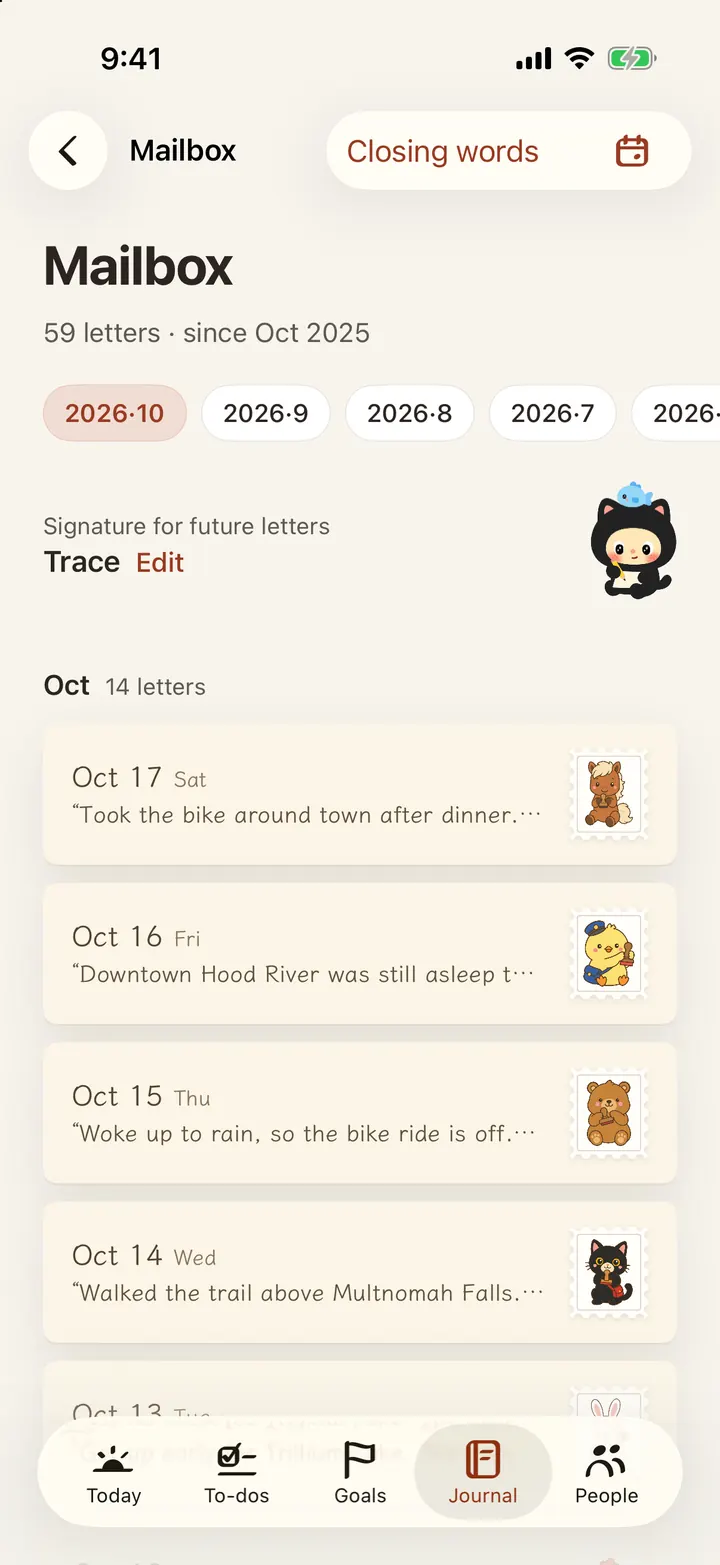
The mailbox: a wooden tray of letters with a list of sealed days below
  1. 01

    During the day, write one line

    One line counts. Or add photos, video, Live Photos, a voice note, a quick sketch — plus the weather, your mood, the place, and whoever was there with you.

  2. 02

    At night, it writes it up

    Ordered by time, weather and mood intact, with what you finished and the dates coming up listed underneath. Read it first — this is what today actually looked like.

  3. 03

    Press the seal

    Sixteen wax seals; the day decides which one, so you never have to pick. Hold the stamp and press down — red, pink, teal, with a rabbit, a duck, a cat.

    Rabbit wax seal Duck wax seal Cat wax seal Tiger wax seal
  4. 04

    File it away

    The letter drops into a wooden tray and gets a stamp. One tray per month. Three years from now, when some August comes back to you, you just pull that tray.

The mailbox

Open that tray in three years.
Every letter is still in it.

The mailbox is bound by month — one wooden tray each. Pull a letter out and the words you wrote, the photos you took and the sound you recorded that day are still inside. Not a summary. The original.

You can also leave a signature for every letter still to come. Some people write their own name. Some write “me, next year.” Some write to a child who isn’t born yet.

  • One letter per day — sealing again replaces that day’s letter
  • Every letter gets a stamp: twelve zodiac animals plus four regulars
  • Flip through by month, or jump straight to a year and month
  • Letters sync across your own devices through your private iCloud
The August 2026 tray, 15 letters

Looking back

You write it down
so you can find it later.

On This Day

Last year today, three years ago today — they come back on their own. “The first tomato on the balcony finally went red.” You’d forgotten. It hadn’t.

Mood calendar

A whole year laid out as a calendar, one colour per day. The month that went badly is visible at a glance.

Photo wall · Year in review

Every photo from every entry, tiled into one wall; and when the year ends, the year gathered up for you.

Footprint map

The places you’ve written from cluster into cities, and the cities join up with the arcs of your trips. Each place carries the photo you took there. Browse it by year, or turn it into a card to share.

The Look Back page: a random old entry, the mood calendar and three doors
The photo wall: every photo from every entry filling the screen
The footprint map: city clusters and travel arcs between them

Keepsakes

Get your days out of the phone.

Screens get replaced. Phones get lost. So Trace lets you turn what you’ve written into something you can hold, send, or put in a drawer.

A printed, bound journal lying on a table by a window

Journal PDF

The whole thing typeset as an A4 book: cover, sections by month, media laid in, full text searchable, ready to send to a printer. Export everything, a date range, or just the entries you pick. All of it happens on your iPhone.

Notebook video

Turn a whole notebook into a vertical video of the pages actually turning. The paper curls and the light moves — the same thing you flip through on the phone.

Share cards

Every entry can be laid out in one of six 3:4 finished designs, and the layout adjusts to the length of the text and the number of photos. Today’s entries, an important date and the footprint map each get one too.